Chapter 12 Case Studies

AWS
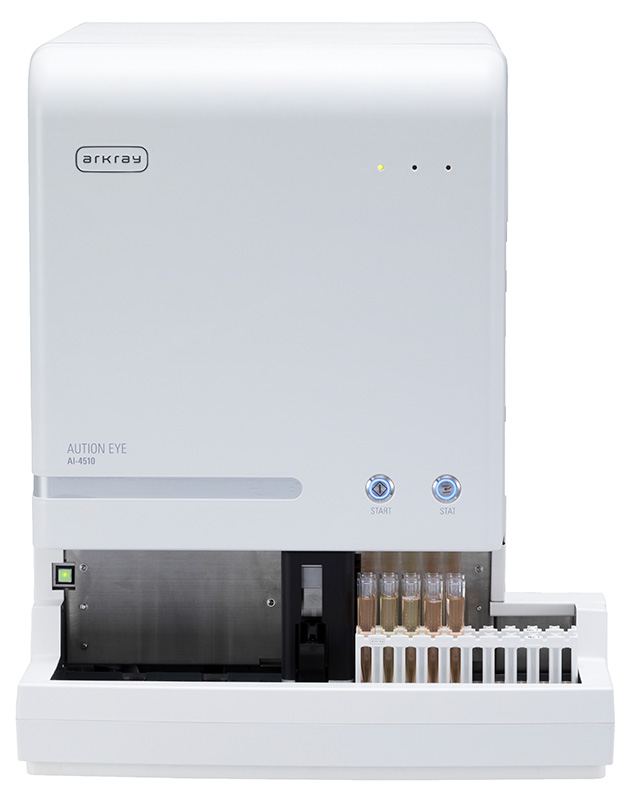
AUTION EYE

Troubleshooting
12.1 DNS Permission Oversight Case
Situation
During the deployment of Smart Assist at Hospital A, a test communication attempt failed to connect.
Symptoms
curl -v https://smartassist.example.com/health

* Could not resolve host: smartassist.example.com
Troubleshooting Process
| Step | Action Taken | Result |
|---|---|---|
| 1 | ping default gateway | Success |
| 2 | nslookup smartassist.example.com | Failed (NXDOMAIN) |
| 3 | nslookup smartassist.example.com 8.8.8.8 | Failed (Timeout) |
| 4 | nslookup google.com | Failed (NXDOMAIN) |
| 5 | ping hospital internal DNS server IP | Success |
Root Cause
The hospital's internal DNS server was running, but forwarding to external DNS (UDP port 53) was not permitted on the firewall. The firewall access request only included HTTPS (443/tcp), and the DNS (53/udp) permission was overlooked.
Resolution
Allowed 53/udp communication from the hospital's internal DNS server to the external DNS server (or upstream DNS forwarder) on the firewall.
Lessons Learned
- Include not only HTTPS communication but also the communication paths required for DNS resolution in the access request
- During the initial interview, confirm whether the hospital's internal DNS can resolve external FQDNs
- Verify test communications step by step, starting from DNS resolution
DNS permission oversights like this case can be prevented with a checklist when submitting firewall access requests. Before submitting the request form, verify the following:
- HTTPS 443/tcp — Smart Assist PC → Destination FQDN
- DNS 53/udp — Hospital internal DNS server → External DNS (forwarder destination)
- NTP 123/udp — Smart Assist PC → NTP server (for time synchronization)
- Security updates — Smart Assist PC → McAfee/Windows Update FQDNs
DNS 53/udp is not needed if the hospital's internal DNS can already resolve external names, but it is best to verify this in advance by running nslookup smartassist.example.com. Simply running this one command before submitting the request would have prevented this case study scenario 100% of the time.
12.2 Proxy Misconfiguration Case
Situation
After deploying Smart Assist at Hospital B, intermittent communication failures were reported during certain time periods.
Symptoms
curl -v --proxy http://proxy.hospital-b.local:8080 https://smartassist.example.com/health

* Connection timed out after 30000 milliseconds
However, the connection sometimes succeeded, and the issue was not consistently reproducible.
Troubleshooting Process
| Step | Action Taken | Result |
|---|---|---|
| 1 | DNS resolution | Success |
| 2 | ping proxy.hospital-b.local | Success |
| 3 | Proxy port connectivity check | Success |
| 4 | curl via proxy | Intermittent failures |
| 5 | curl without proxy | Always succeeded |
| 6 | Proxy log review | Sporadic authentication errors were recorded |
Root Cause
Hospital B's proxy was an authenticated proxy (NTLM authentication). While the Smart Assist PC had authentication credentials configured in environment variables, periodic re-authentication was required due to NTLM authentication session timeouts. The Smart Assist client did not support re-authentication.
Resolution
After consulting with the hospital IT staff, the following measures were implemented:
- Added the Smart Assist PC's IP address to the proxy's authentication bypass list
- Controlled proxy communication permissions using a destination FQDN whitelist
Lessons Learned
- Verify the proxy authentication method and Smart Assist client's authentication support in advance
- Suspect timeout or session management issues when dealing with intermittent failures
- In authenticated proxy environments, consider service accounts or authentication bypass
12.3 Case Blocked by Security Review
Situation
When Smart Assist deployment was proposed at Hospital C, it was blocked during the security review, causing a 3-month delay.
Issues Raised During the Review
| # | Issue | Severity |
|---|---|---|
| 1 | Unclear response to "Is the communication bidirectional?" | High |
| 2 | Incomplete list of transmitted data | High |
| 3 | No response regarding data retention period in the cloud | Medium |
| 4 | No explanation of whether testing operations completely stop during outages | Medium |
| 5 | Unclear compliance status with applicable regulations and guidelines | High |
What Went Wrong
- Issue 1: The engineer responded "It's bidirectional because results are returned." The correct explanation should have been "Outbound Only (responses are session replies)."
- Issue 2: The data transmission explanation only stated "images are sent" without explicitly denying that "patient information is not included."
- Issue 3: The data retention policy had not been verified in advance.
- Issue 4: It was not explained that confirmed data is sent to LIS as normal even when Smart Assist is down.
- Issue 5: No documentation had been prepared outlining compliance status with applicable regulations (Japan: Three-Ministry Two-Guideline Framework, US: HIPAA, EU: GDPR).
How It Was Resolved
| Issue | Action Taken |
|---|---|
| 1 | Created a communication sequence diagram and provided a technical explanation that it is Outbound Only |
| 2 | Created a comprehensive list of transmitted data (explicitly stating what is and is not included) |
| 3 | Obtained and submitted the data retention policy from the cloud operations team |
| 4 | Created a failure impact analysis document explaining continuity of testing operations |
| 5 | Created a compliance status matrix for each requirement of applicable regulations (Three-Ministry Two-Guideline Framework / HIPAA / GDPR) |
Lessons Learned
- Questions asked during security reviews are predictable (see Chapter 3, Section 3.5)
- Instead of "researching after being asked," "prepare documentation before being asked"
- Do not use the expression "bidirectional communication" — accurately explain it as "Outbound Only session responses"
- Explicit denial ("is not included") is just as important as affirmative explanations
12.4 Communication Failure Due to SSL Inspection
Situation
During Smart Assist deployment testing at Hospital D, the HTTPS connection failed with a certificate error.
Symptoms
curl -v https://smartassist.example.com/health

* SSL certificate problem: unable to get local issuer certificate
Troubleshooting Process
| Step | Action Taken | Result |
|---|---|---|
| 1 | DNS resolution | Success |
| 2 | Port 443 connectivity | Success |
| 3 | HTTPS connection via curl | SSL certificate error |
| 4 | Certificate issuer verification | issuer: CN=D-Hospital-Proxy-CA |
| 5 | Confirmed with hospital IT staff | "We perform SSL inspection on all HTTPS traffic via proxy" |
Root Cause
Hospital D performed SSL inspection on all HTTPS traffic as a security measure. The proxy established a TLS connection with the Smart Assist server, then presented a certificate signed with the proxy's own CA certificate to the Smart Assist PC.
The certificate validation failed because the hospital proxy's CA certificate was not included in the Smart Assist PC's trusted root certificate store.
Resolution
After consulting with the hospital IT staff, the following measures were implemented:
Approach A (Adopted): SSL Inspection Bypass
- Added the Smart Assist destination FQDN (
smartassist.example.com) to the SSL inspection bypass list - The Smart Assist PC now directly validates the legitimate AWS server certificate, resolving the error
Approach B (Not Adopted): Installing the Proxy CA Certificate
- Reason for rejection: The Smart Assist application uses its own certificate store, so installing the certificate only in the OS certificate store was insufficient
Lessons Learned
- Always confirm whether SSL inspection is in use during the initial interview
- When a certificate error occurs, first check the issuer
- SSL inspection bypass is the simplest and most reliable solution
- When requesting a bypass, clearly specify which FQDNs should be excluded
When you ask hospital IT staff to bypass SSL inspection, there is a high probability of resistance. They will typically say, "Our security policy requires inspection of all HTTPS traffic."
An effective negotiation technique is to present alternative safeguards:
- "The communication destination is solely our company-managed environment on AWS, protected by WAF and GuardDuty" (safety of the destination)
- "Traffic is encrypted with TLS 1.2, so the risk of man-in-the-middle attacks is low even without inspection" (encryption assurance)
- "The operational environment is ISO 27001 certified" (third-party certification)
Rather than saying "Please bypass it," saying "Here are three reasons why bypassing is safe" typically leads to smooth approval. Requesting a bypass without providing justification damages trust and should be avoided.
12.5 Real-World Log Analysis Case
Situation
Communication from a running Smart Assist instance at Hospital E suddenly failed. It had been working normally until the previous day.
Collected Logs
curl Output from the Smart Assist PC
curl -v https://smartassist.example.com/health

* Trying 52.194.10.20:443...
* Connected to smartassist.example.com (52.194.10.20) port 443
* TLSv1.2 (OUT), TLS handshake, Client hello (1):
* TLSv1.2 (IN), TLS handshake, Server hello (2):
* TLSv1.2 (IN), TLS handshake, Certificate (11):
* TLSv1.2 (OUT), TLS alert, certificate expired (557):
* SSL certificate problem: certificate has expired
Certificate Information Verification
openssl s_client -connect smartassist.example.com:443 < /dev/null 2>/dev/null \
  | openssl x509 -noout -dates -issuer -subject

subject= /CN=smartassist.example.com
issuer= /C=US/O=Amazon/CN=Amazon RSA 2048 M01
notBefore=Feb 15 2025 00:00:00 GMT
notAfter=Feb 14 2026 00:00:00 GMT     ← Within validity period
Analysis
- curl displays "certificate has expired"
- However, the server certificate's expiration date confirmed via openssl is February 14, 2026, which is still within the validity period
How should this contradiction be interpreted?
Additional Investigation: Intermediate Certificate Verification
openssl s_client -connect smartassist.example.com:443 -showcerts < /dev/null 2>&1

---
Certificate chain
 0 s:/CN=smartassist.example.com
   i:/C=US/O=Amazon/CN=Amazon RSA 2048 M01
   Validity: Not After: Feb 14 2026         ← Server certificate (valid)
 1 s:/C=US/O=Amazon/CN=Amazon RSA 2048 M01
   i:/C=US/O=Starfield Technologies/CN=Starfield Services Root CA
   Validity: Not After: Feb 10 2026         ← Intermediate certificate (expired!)
---
Root Cause
The server certificate itself was within its validity period, but the intermediate certificate (Intermediate CA Certificate) had expired. Because the intermediate certificate in the certificate chain had expired, the entire certificate chain validation failed.
Resolution
Escalated to the Smart Assist operations team, who updated the intermediate certificate configured on the load balancer (ALB) on AWS.
Key Points in Log Analysis
| Point | Details |
|---|---|
| Do not judge based on the error message alone | "certificate expired" does not necessarily mean the server certificate is the cause |
| Verify the entire certificate chain | Use the -showcerts option to display intermediate certificates as well |
| Verify with multiple tools | Confirm from different angles using curl and openssl |
| Use "it was working yesterday" as a clue | Suspect time-related causes (certificate expiration, license expiration, etc.) |
12.6 Security Presentation Example for a University Hospital
Situation
Smart Assist deployment was proposed to University Hospital F (a large-scale university hospital). University hospitals maintain their own information security policies with rigorous security reviews. This case study examines the structure of documentation actually prepared for a university hospital, to learn how to make proposals to large-scale facilities.
Characteristics of University Hospital Security Reviews
University hospital security reviews have the following characteristics compared to general small-to-medium-sized hospitals.
| Characteristic | General Hospital | University Hospital |
|---|---|---|
| Review structure | IT staff decision | Information security committee deliberation |
| Review period | 1-4 weeks | 1-6 months (dependent on committee meeting cycle) |
| Required documentation | Basic system overview | Detailed technical design documents, risk assessment results |
| Security standards | Facility-specific standards | University-wide policy + medical school/hospital-specific standards |
| Departments involved | IT department only | IT department + medical informatics department + administrative department + potentially research department |
Documentation Structure (For University Hospitals)
Documentation for university hospitals is organized into four parts. Each part uses extensive diagrams so that security committee members (who are not necessarily technical experts) can understand the content.
Part 1: Overall Cloud System Architecture
The overall system architecture is explained using an AWS cloud architecture diagram.
| Element | Details | Key Points to Emphasize |
|---|---|---|
| Hospital side | AUTION EYE → PC → Hospital LAN → Firewall | Operates within existing hospital infrastructure |
| Communication path | Outbound Only (443/tcp) | No inbound connections whatsoever |
| AWS architecture | ALB → Lambda → S3/RDS | Reduced operational burden through managed services |
| Authentication | Cognito (identity management) | Only authenticated devices can access the system |
Part 2: Security Design Details
The following elements are presented in diagrams and tables as detailed technical explanations.
| Security Element | Implementation | How to Explain |
|---|---|---|
| Communication encryption | TLS 1.2 + AES | Encryption across all segments of the communication path |
| Authentication & authorization | Cognito + IAM | Access control based on device ID |
| Network isolation | Private Subnet + Security Group | Database is inaccessible from external networks |
| Data protection | S3 encryption + RDS encryption | Stored data is also encrypted |
| Audit logs | CloudTrail + CloudWatch | All access is logged |
| Threat detection | GuardDuty + Shield | DDoS protection and anomaly detection |
Part 3: Specific Firewall Configuration Instructions
Specific configuration values are provided so that the university hospital's IT department can perform the actual FW setup.
| Destination Category | FQDN/URL | Port | Direction |
|---|---|---|---|
| Smart Assist API | *.arkray-smartassist.com | 443/tcp | Outbound |
| Image storage | *.s3.us-east-1.amazonaws.com | 443/tcp | Outbound |
| Time synchronization | ntp.nict.jp etc. | 123/udp | Outbound |
This directly provides the FW permitted FQDN list explained in Chapter 7, Section 7.7 to the university hospital IT department.
Part 4: Third-Party Certifications and Audit Results
University hospitals tend to place particular emphasis on third-party certifications. The following three layers of security assurance are presented.
| Certification/Report | Target Layer | Documentation to Present | Reference Chapter |
|---|---|---|---|
| ISO/IEC 27001 | Application development & operations | MSA-IS-718 Certificate | Chapter 9, Section 9.7 |
| SOC 2 Type II | AWS infrastructure | SOC 2 Report | Chapter 8, Section 8.8 |
| HIPAA Risk Assessment | Regulatory compliance | ecfirst audit report | Chapter 9, Section 9.6 |
Anticipated Questions and Responses for University Hospitals
| Question | Key Points for Response |
|---|---|
| "Where is the data stored?" | AWS US region (us-east-1). Stored data is encrypted. Data retention period can be configured based on policy |
| "Is there a risk of external access to the hospital network?" | Because it is Outbound Only, inbound connections from outside are completely impossible. This can be verified in the firewall rules |
| "What is the incident notification structure?" | Automatic detection by GuardDuty, immediate notification via CloudWatch Alarm. Support contact information is provided |
| "Does it comply with the university's information security policy?" | ISO 27001 certified, compliant with international information security standards. If alignment with specific policies is needed, we will accommodate |
| "Are there deployment precedents at other university hospitals?" | Specific facility names cannot be disclosed due to confidentiality obligations, but we can confirm deployment experience at facilities of comparable scale |
Lessons Learned
- At university hospitals, confirm the committee deliberation schedule early and incorporate it into the deployment plan
- Documentation should include both diagrams understandable to non-technical audiences and specific configuration values that technical staff can verify
- Presenting third-party certifications is often the deciding factor in gaining trust
- Plan the schedule with at least 6 months or more from proposal to go-live (see Chapter 11, Section 11.7)
Summary of All Case Studies
| Case | Cause Category | Root Cause | Prevention |
|---|---|---|---|
| 12.1 | DNS | DNS traffic not permitted on FW | Include DNS in communication requirements |
| 12.2 | Proxy | Authenticated proxy session timeout | Verify authentication method in advance |
| 12.3 | Process | Inadequate security review and regulatory compliance documentation | Advance documentation preparation and anticipated Q&A |
| 12.4 | SSL | Certificate replacement by SSL inspection | Confirm during initial interview |
| 12.5 | Certificate | Intermediate certificate expiration | Establish certificate monitoring mechanisms |
| 12.6 | Process | Rigorous security review at university hospital | Understand committee schedules, prepare multi-layered documentation |
Supplementary Note (International Context): The case studies in this chapter are based on Japanese hospital environments, but the technical issues (DNS permission oversights, proxy misconfiguration, SSL inspection, certificate expiration) occur regardless of region. For the security review process (12.3), readers in the US should map it to the HIPAA-compliant Security Risk Assessment and BAA execution processes, and readers in the EU should map it to the GDPR DPIA process.
Summary of This Training Material: Network engineers for Smart Assist need not only knowledge of communication technologies, but also the ability to understand the medical IT context and build trusted relationships with hospital IT staff. We hope that you will use the knowledge gained from this training material as a foundation, accumulate practical experience, and grow into self-reliant engineers.