Chapter 11 Deployment Operations Process
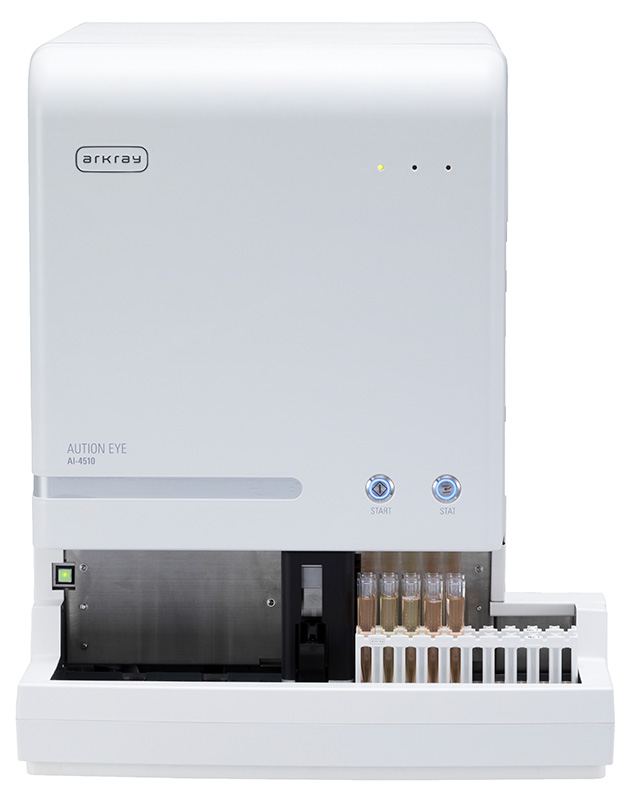
Target device for Smart Assist deployment: AUTION EYE AI-4510
11.1 Pre-Deployment Interview
Purpose of the Interview
When deploying Smart Assist, the first step is to accurately understand the hospital's network environment. Insufficient information gathering directly leads to deployment issues and rework during security reviews.
Interview Item List
| Category | Item to Confirm | Reason for Confirmation |
|---|---|---|
| Network Configuration | Availability of hospital network diagram | Understanding the overall picture |
| Segment where the Smart Assist PC is installed | Needed for FW rule design | |
| Smart Assist PC IP address (static/DHCP) | Identifying the source | |
| Default gateway | Understanding the routing path | |
| DNS | Presence and IP address of hospital DNS server | Understanding the DNS resolution path |
| Whether external FQDN resolution is possible | Name resolution for Smart Assist destinations | |
| Firewall | FW device type and manufacturer | Confirming FQDN-based allow rule support |
| Current external communication allow policy | Understanding the request process | |
| Change request procedure and lead time | Schedule planning | |
| Proxy | Presence of proxy server | Communication path design |
| Proxy address and port | PC-side configuration | |
| Presence and type of authentication | Whether authentication configuration is needed | |
| Presence of SSL inspection | Proactive identification of certificate issues | |
| Security | Whether a security review is required | Preparation for response |
| Review process and required duration | Schedule planning | |
| Past external connection approval history | Assessing likelihood of approval |
There are many interview items, but there are three that you absolutely must not miss:
- Proxy presence and authentication method — The #1 cause of deployment issues. Don't just ask "Do you have a proxy?" — also ask "Do you have a URL filtering product?" (to address transparent proxies)
- Presence of SSL inspection — If you overlook this, you'll face a crisis on deployment day with "certificate errors preventing connection." It's best to verify the certificate issuer with
curl -vduring the interview - FW change request lead time — "It takes 2 weeks from request to implementation" is common. At university hospitals, it can take 1-2 months. If you don't know this, your schedule will fall apart
Interview Sheet (Template)
Smart Assist Pre-Deployment Interview Sheet
| Basic Information | |
|---|---|
| Hospital Name | ____________________ |
| Contact Person | ____________________ |
| Interview Date | YYYY-MM-DD |
Network Configuration
- Network diagram available: Yes / No
- Smart Assist PC installation location: ________________
- IP Address: ________ / Subnet: ________
- Default GW: ________
DNS
- Hospital DNS Server: Yes (IP: ________) / No
- External FQDN Resolution: Yes / No / Unknown
Firewall
- FW Model: ________________
- FQDN-based allow rules supported: Yes / No / Unknown
- Change request lead time: Approx. ____ days
Proxy
- Proxy Server: Yes (________:____) / No
- Authentication: Yes (Method: ________) / No
- SSL Inspection: Yes / No / Unknown
Security Review
- Review required: Yes / No
- Required duration: Approx. ____ to ____ days
11.2 Security Review Response
Security Review Process
At many hospitals, a security review is required when deploying systems that involve external connectivity. In Japan, this involves consultation with the Information Security Committee; in the US, vendor risk assessments (questionnaires such as SIG/CAIQ/HECVAT) and HIPAA Security Risk Assessments; and in the EU, DPIAs (Data Protection Impact Assessments) under GDPR Article 35.
Documents to Submit
| Document | Contents |
|---|---|
| System overview | Purpose and business workflow of Smart Assist |
| Communication flow diagram | Communication paths, protocols, port numbers |
| Security design document | Encryption methods, authentication methods, access control |
| Data flow diagram | Contents of transmitted data (explicitly stating what is/is not included) |
| Firewall allow request form | Source, destination, port, direction |
| Regulatory compliance status | Compliance status with medical data regulations in each country (Japan: Three-Ministry Two-Guideline Framework, US: HIPAA, EU: GDPR) |
| Failure impact analysis | Business impact when Smart Assist is down |
Preparing for Expected Questions
Prepare answers in advance for the questions listed in Section 3.5 of Chapter 3, ensuring consistency with the submitted documents. Inconsistencies in answers will erode trust.
11.3 Network Configuration Verification
What to Do During On-Site Verification
Based on the interview information, verify the actual network configuration on-site.
Verification Checklist
| # | Item to Verify | Verification Method | Result |
|---|---|---|---|
| 1 | Smart Assist PC IP address | ipconfig | ... |
| 2 | Subnet mask | ipconfig | ... |
| 3 | Default gateway | ipconfig | ... |
| 4 | DNS server | ipconfig /all | ... |
| 5 | Connectivity to GW | ping GW_IP | OK / NG |
| 6 | Connectivity to DNS server | ping DNS_IP | OK / NG |
| 7 | External FQDN resolution | nslookup smartassist.example.com | OK / NG |
| 8 | External connectivity (ICMP) | ping 8.8.8.8 | OK / NG |
| 9 | Port 443 connectivity | Test-NetConnection -Port 443 | OK / NG |
| 10 | HTTPS connection test | curl -v https://... | OK / NG |
Recording Verification Results
Record all verification results as screenshots or text logs. These serve as a baseline for comparison when failures occur.
11.4 Test Communication Procedure
Purpose of Test Communication
Before sending production data, confirm that network paths are correctly configured.
Test Procedure
| Step | Description | Verification Point |
|---|---|---|
| 1 | DNS resolution test | Confirm that the destination FQDN can be resolved via nslookup |
| 2 | Port connectivity test | Confirm that connection to port 443/tcp succeeds |
| 3 | HTTPS connection test | Confirm that an HTTPS connection can be established via curl |
| 4 | TLS certificate verification | Confirm that the certificate issuer and expiration date are correct |
| 5 | Health check API | Connect to the Smart Assist health check endpoint |
| 6 | Test data submission | Upload a test image and obtain a receipt confirmation |
| 7 | Test result retrieval | Confirm that classification results for the test data are returned |
| 8 | LIS integration test | Confirm that results are successfully sent to LIS |
When test communication succeeds, always save screenshots and logs. Saying "it was connected during testing" won't help if there's no evidence when problems arise later.
Minimum items to save:
- Full output of
curl -v(contains TLS version, certificate information, and HTTP status all in one) nslookupresults (DNS resolution baseline)ipconfig /allresults (network configuration baseline)- Notes on the date and time of testing
Saving these as "deployment test results" in a folder allows you to compare "what changed since testing" when failures occur, dramatically speeding up troubleshooting.
Test Success Criteria
| Criteria | Description |
|---|---|
| Required | All of steps 1-7 must succeed |
| Required | LIS must successfully receive results in step 8 |
| Recommended | Communication response times should be within acceptable range |
| Recommended | Results should be stable across multiple test runs |
11.5 Production Cutover
Final Checks Before Cutover
| Item to Confirm | Description |
|---|---|
| Test communication success | All test items have passed |
| Security review approval | Formal approval has been obtained from the hospital |
| Stakeholder notification | Notification of cutover date/time to laboratory and IT departments |
| Rollback procedure confirmation | Procedures for reverting to the original state in case of issues have been prepared |
Cutover Procedure
| Step | Description | Responsible Party |
|---|---|---|
| 1 | Temporarily halt laboratory testing operations (if necessary) | Laboratory Department |
| 2 | Change Smart Assist client settings to production | Engineer |
| 3 | Connection test to production environment | Engineer |
| 4 | Functional verification with test data | Engineer + Laboratory Technician |
| 5 | Functional verification with actual specimens | Laboratory Technician |
| 6 | Verify result integration with LIS | Laboratory Technician |
| 7 | Begin production operation | All parties |
Rollback Criteria
If any of the following conditions are met, abort the production cutover and revert to the original state.
- Connection test to the production environment fails
- Test data submission or result retrieval fails
- Result integration with LIS does not function properly
- The laboratory department reports business impact
11.6 Incident First-Response Flow
Initial Response When an Incident Occurs
When you receive an incident report saying "it was working yesterday but suddenly can't communicate," there's one thing you should check first: "Have there been any recent FW or proxy configuration changes?"
In fact, the most common cause of sudden communication failures is FW/proxy configuration changes made by the hospital IT department (for maintenance or policy updates). In particular:
- FW firmware updates that reset FQDN allow rules
- URL filtering category changes that block Smart Assist destinations
- SSL inspection policy changes that remove exclusion settings
Simply asking this one question before starting troubleshooting can dramatically reduce the time to root cause identification.
Escalation Contact List (Template)
| Category | Responsible Party | Contact | Hours of Operation |
|---|---|---|---|
| Hospital Network / FW / Proxy | Hospital Information Systems Dept. / IT Department [Contact Name] | [Phone Number] | [Hours of Operation] |
| Smart Assist Cloud Side | [Operations Organization Name] Operations Team | [Phone Number] / support@example.com | 24x7 |
| Laboratory Department (Business Impact Reporting) | Laboratory Dept. [Laboratory Manager Name] | [Extension/Phone Number] | --- |
| Regulatory / Compliance (as needed) | Japan: Personal Information Manager / US: HIPAA Privacy Officer / Security Officer / EU: DPO | [Fill in as applicable] | --- |
Incident Report Items
| Item | Description |
|---|---|
| Date/time of occurrence | Date and time when the incident occurred (time of first recognition) |
| Date/time of resolution | Date and time when the incident was resolved |
| Impact scope | Operations affected and operations not affected |
| Symptoms | Specific error messages and description of behavior |
| Root cause | Cause identified through triage |
| Response actions | Details of recovery actions performed |
| Preventive measures | Measures to prevent the same incident from recurring |
11.7 How to Read the Materials: First Attack Presentation Materials
Overview of the Materials
The First Attack presentation materials are the sales and deployment materials used for initial proposals to new Smart Assist customers. Understanding these materials enables you to grasp the overall service picture, pricing structure, and deployment schedule that should be explained to the hospital during the proposal stage.
Why do engineers need to understand these materials? Because engineers handle the deployment work after the sales representative's initial proposal. Accurately understanding "what sales promised" directly prevents deployment issues.
Pricing Plans
Smart Assist has two basic plans based on specimen processing volume, plus additional pricing options.
Note: The following pricing plans are for the Japanese market. The US version has a separate pricing structure.
| Plan | Monthly Fee (excl. tax) | Monthly Specimen Processing | Target Scale |
|---|---|---|---|
| Assist300 | ¥100,000 | 300 specimens/month | Small to medium facilities |
| Assist1000 | ¥200,000 | 1,000 specimens/month | Large facilities |
| Option | Price | Description |
|---|---|---|
| Charge100 | ¥40,000/month | Additional processing capacity for 100 specimens |
Estimated Deployment Schedule
The First Attack materials show the following phases as a typical schedule from proposal to go-live.
| Phase | Estimated Duration | Description |
|---|---|---|
| Phase A: Preparation | Approx. 3-4 months | Contract procedures, security review application, network environment interview and investigation |
| Phase B: Deployment & Verification | Approx. 3-4 months | Equipment installation, network configuration, test communication, production cutover, verification operation |
| Total | Approx. 6-8 months | From proposal to full production |
Note: The duration of security reviews varies greatly by hospital. At university hospitals and large hospitals, it may take several months to align with the Information Security Committee's review cycle (see Chapter 12 Case Studies).
Information to Gather at the Proposal Stage
Confirming and collecting the following information together with the sales representative at the initial proposal stage will make subsequent deployment smoother.
| Category | Item to Confirm | Impact on Deployment Work |
|---|---|---|
| Facility Scale | Monthly specimen processing volume | Plan selection (Assist300 or Assist1000) |
| Network | Availability of internet connection | Selection of connectivity option (see Chapter 6) |
| Security | Whether security review is required and its duration | Impact on the overall schedule |
| LIS Integration | LIS manufacturer, model, and connection method | Advance preparation of integration settings |
| Installation Location | Laboratory layout, LAN environment | Wiring plan, IP design |
| IT Department | Availability of IT contact person | Point of contact for interviews and requests |
Information Sharing Points with Sales Representatives
As an engineer, it is important to confirm the following points with sales representatives in advance.
- Contract plan: Which plan was proposed (Assist300/Assist1000)
- Promised go-live date: Is the schedule realistic considering the security review period?
- Special conditions: Information about VPN requirements, proxy environments, SSL inspection, etc.
- Customer concerns: Points of particular security concern (data location, PHI, regulatory compliance, etc.)
In the next chapter, case studies based on actual incidents and deployment difficulties will connect the knowledge learned to practical application.